Tokenizing Yield
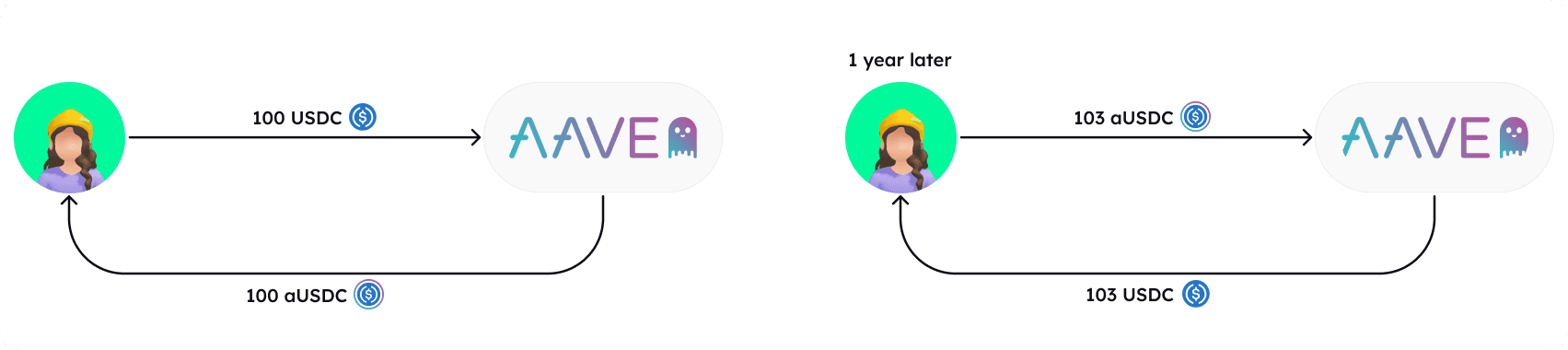
As mentioned in getting-started.md, the fundamental concept of tokenizing yield means that the future yield generated is separated from the underlying principal asset. So if a yield of 3% is generated on 100 USDC after 1 year, the 3% yield (3 USDC) is the yield, and 100 USDC is the principal.
Step by step
1. Find a PrincipalToken
Each Principal Token is associated to an Interest Bearing Token (IBT) and has a specific duration (a specific expiry date).
- PTs are designed to operate with any ERC4626 Tokenized Vault token.
- Each IBT is associated to an underlying. The underlying assets of the IBT are verified using
ERC4626.asset()
Available ERC4626 Vaults on the relevant network can be found at https://erc4626.info.
Additionally, new Principal Tokens for any Interest Bearing Token that complies with the ERC-4626 standard can be deployed without the need for special permissions, see how to deploy PT and LP Vault in a permisionless manner.
To find a relevant PrincipalToken:
- All Principal Tokens deployed using the Factory can be accessed through the Registry. The number of tokens deployed is determined using
Registry.pTCount(). The PT at each index from 0 toptCountis retrievable usingRegistry.getPTAt(). - Verify the Interest Bearing Token (IBT) tokenized in the PT contract using
getIBT(), then examine its conversion rate over recent blocks usingIBT.convertToAssets(). - The maturity and duration of the PT are checked using
PT.maturity().
2. Deposit
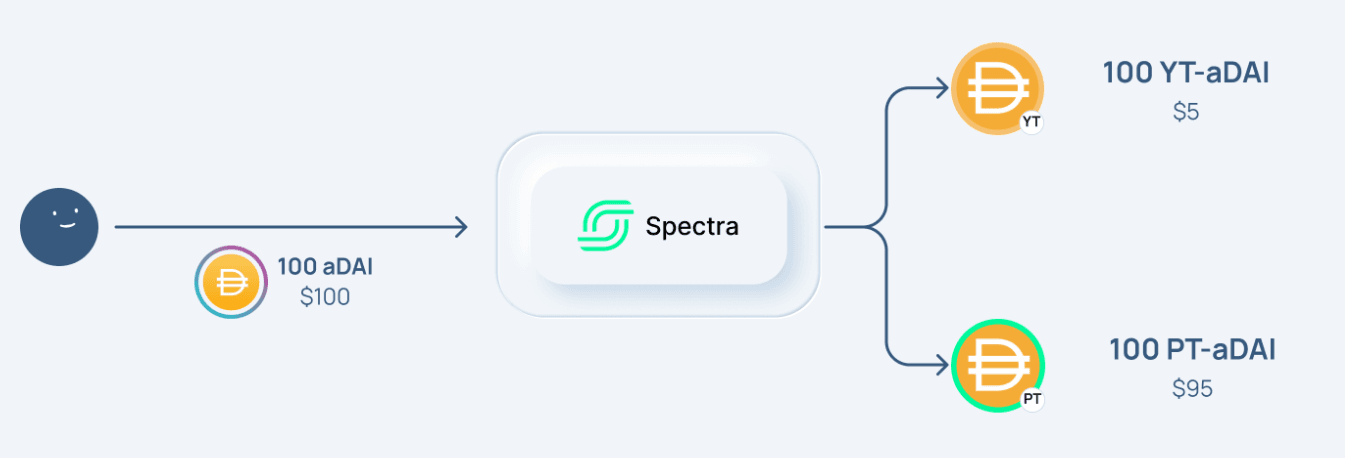
Deposit either the underlying asset (e.g. USDC) or an Interest Bearing Token of the underlying asset (e.g. aUSDC).
The relevant allowance of the token must be approved for the associated PrincipalToken contract before depositing.
- If depositing the underlying asset, use PrincipalToken's
deposit(). - If depositing the interesting bearing token, use
depositIBT().
3. Receive PT and YT
During the deposit, the depositor receives:
- Principal Token (PT): This represents the original amount deposited, i.e. the principal amount. This is also referred to as 'shares' of the PrincipalToken.
- Yield Token (YT): Minted by the PrincipalToken contract, the Yield Tokens represents the generated yield from the deposited principal. YT holders can claim the yield generated by the corresponding deposited IBTs over time as they hold the token.
4. Before expiry
Before the expiry/maturity, a YT/PT holder can:
- Claim the yield generated by the YT, see
claimYield() - Trade or sell YT to hedge interest rate risks.
- Trade or sell PT, speculating on interest rates without exposure to the principal asset.
- Earn additional yield by providing liquidity to the IBT-PT pairs on AMMs. See Providing Liquidity.
- Withdraw the equivalent assets in proportion to the amount of PT and YT they currently hold, i.e. convert their PT and YT to the underlying asset (e.g. USDC) and exit their position. See
withdraw()andredeem().
Before expiry a user needs the same amount of PT and YT to be able towithdraw() or redeem().
5. After expiry
After expiry/maturity, the token holder could:
- Redeem the underlying assets of the PT, see
redeem()andwithdraw() - Claim the remaining yield of the YT see claimYield().
The token holder after expiry does not need to be the same as the depositor. Both PT and YT are transferable tokens.
E.g. they could have purchased the PT at a discount and waited for expiry, earning a fixed yield since all PT are redeemable to the underlying asset at expiry.